A smart power strip can put lamps, monitors, and other plug-in devices on separate schedules without filling every wall outlet with adapters. The right choice depends on how many devices you need to control and which smart-home platform you use.
These 10 options span compact three-outlet strips, larger desk-friendly models, USB-equipped charging stations, and models with energy monitoring or Matter support.
Best 10 Smart Power Strips Picks for 2026
Best for Energy Tracking
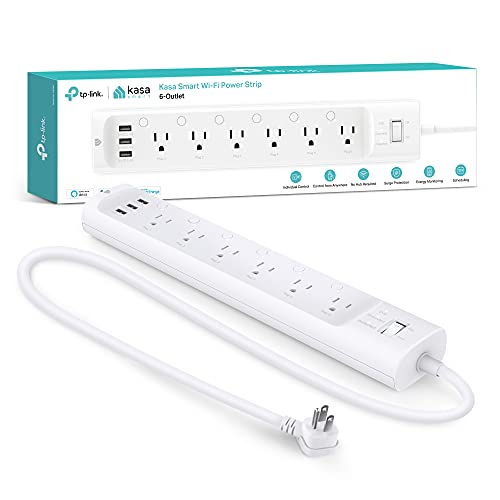
- Six independently controlled AC outlets
- Per-outlet energy monitoring
- Three USB ports; ETL-certified surge protection
Best For: Tracking and controlling home-office devices individually
Best for Matter Homes
Tapo P316M Smart Wi-Fi Power Strip

- Six individually controlled AC outlets
- Matter support and per-outlet energy monitoring
- Three always-on USB ports; flush-fitting plug
Best For: Mixed-platform smart homes needing outlet-level control
Best for Alexa Setups
Amazon Basics Smart Plug Power Strip

- Six individually controlled or grouped outlets
- Two USB-A ports and one USB-C port
- Alexa app schedules; no hub required
Best For: Alexa households wanting outlet routines and USB-C
Compact Surge Protection

- Three individually controlled outlets
- Two USB ports
- ETL-certified, 750-joule surge protection
Best For: Small setups needing smart outlets and surge protection
Behind-Furniture Fit

- Three independently controlled outlets
- Low-profile plug and 4-foot cord
- 490-joule surge protection
Best For: Three-device setups near furniture
Best Heavy-Duty Pick

- Four independently controlled smart outlets
- App-based energy tracking and schedules
- USB-A and USB-C charging ports
Best For: Monitoring consumption while scheduling a few devices
Best for an Always-On Device
Westinghouse WH-320 Smart Strip

- Three smart outlets plus one always-on outlet
- Daily, weekly, and countdown scheduling
- Hub-free Alexa and Google Assistant control
Best For: Keeping one device powered while scheduling three others
Best for Energy Tracking – Kasa HS300 Smart Power Strip
Among smart power strips, the Kasa HS300 is a practical choice when you want to see how much power each connected device uses. Its six AC outlets can be controlled independently through the Kasa app, while three USB ports provide charging space.
Best For: Home offices and entertainment setups that need individual outlet control and per-outlet energy monitoring.
Pros:
- Monitors energy use separately for each AC outlet.
- Offers six independently controlled outlets and three USB ports.
- Includes ETL-certified surge protection and works with Alexa and Google Assistant.
Cons:
- The three USB ports share a 5V/2.4A total output.
- The entire strip has a 15A, 1,875W maximum load.
Choose the HS300 if tracking individual devices matters more to you than simply switching the whole strip on and off. Check the shared USB output and total load against what you plan to connect.
Best for Matter Homes – Tapo P316M Smart Wi-Fi Power Strip
The Tapo P316M stands out among smart power strips for its Matter support, which makes it a strong fit for homes using different smart-home platforms. It combines six individually controlled AC outlets, per-outlet energy monitoring, and three always-on USB ports.
Best For: Mixed-platform smart homes that want individual outlet schedules and energy data.
Pros:
- Matter support enables use with major platforms including Apple Home, Google Home, Alexa, and SmartThings.
- Tracks energy use for each AC outlet and supports individual schedules.
- Has a flush-fitting plug and can control AC outlets through the Tapo app over a local network during internet outages.
Cons:
- The three USB ports are always on rather than individually controlled.
- Its 3-foot cord may limit placement compared with a longer-cord strip.
This is the most flexible platform choice in this group if Matter is part of your setup. Use the Tapo app to check for firmware updates, as the manufacturer recommends for best performance.
Best for Extra Outlets – Geeni Surge Ultra Smart Power Strip
If you need room for devices that should stay powered, the Geeni Surge Ultra offers a useful variation on smart power strips: six individually controlled outlets plus two always-on outlets. Its 6-foot cord also gives you more flexibility when placing the strip away from a wall socket.
Best For: Setups that mix scheduled accessories with equipment that needs constant power.
Pros:
- Provides eight AC outlets, including two that remain on.
- Offers a 6-foot cord and 1,200-joule surge protection.
- Works through the Geeni app or Alexa and Google Assistant without a hub.
Cons:
- Only six of the eight AC outlets have individual smart control.
- The supplied notes do not list energy monitoring.
The two always-on outlets are the main reason to pick this model: they let essential devices remain powered while you automate other plugged-in gear. Choose a different strip if monitoring device-level electricity use is a priority.
Best for Alexa Setups – Amazon Basics Smart Plug Power Strip
For Alexa households shopping for smart power strips, this Amazon Basics model keeps setup in the Alexa app without requiring a hub. Its six AC outlets can be controlled independently or grouped, and its three USB ports include one USB-C port.
Best For: Alexa users who want simple outlet routines and both USB-A and USB-C charging connections.
Pros:
- Controls six AC outlets individually or as a group through Alexa.
- Includes two USB-A ports and one USB-C port.
- Supports remote control and schedules, with 790-joule surge protection.
Cons:
- Works with Alexa only, not other voice-assistant platforms listed for some alternatives.
- Requires a 2.4 GHz Wi-Fi connection.
This is a straightforward pick if you already use Alexa routines and want USB-C on the same strip. If your smart home runs on another platform, its Alexa-only compatibility is the key limitation.
Most Outlets – Yozisital 8-Outlet Smart Charging Station
If you need smart power strips for a crowded desk, the Yozisital combines six individually controlled smart outlets, two regular outlets, and four USB ports. Its 5-foot cord and flat plug add flexibility when positioning it around a home office.
Best For: Desks with several devices that need separate schedules or remote switching.
Pros:
- Six smart outlets can be controlled individually through the Smart Life app.
- Two regular outlets plus two USB-A and two USB-C ports accommodate additional devices.
- Supports schedules and works with Alexa and Google Home.
Cons:
- Requires a compatible 2.4 GHz Wi-Fi network; it does not support 5 GHz Wi-Fi.
- Only six of the eight AC outlets offer smart control.
This is the capacity-focused option if outlet count matters most. Check your Wi-Fi setup before buying, and plan to use the two regular outlets for devices that do not need automation.
Compact Surge Protection – Kasa Smart KP303 Power Strip
Among smart power strips for a smaller setup, the Kasa Smart KP303 pairs three individually controlled outlets with two USB ports. Its ETL-certified, 750-joule surge protection is a useful addition for a desk or entertainment area.
Best For: A few connected devices that need individual outlet control and surge protection.
Pros:
- Three smart outlets can be controlled individually.
- Provides two USB ports alongside the AC outlets.
- Offers ETL-certified, 750-joule surge protection and works with Alexa and Google Home.
Cons:
- Three AC outlets may be too few for a device-heavy setup.
- Has fewer USB ports than the Yozisital strip in this roundup.
Choose the KP303 if you want a modest number of controlled outlets and documented surge protection rather than maximum outlet capacity. Its smaller layout is less suitable when several AC plugs must share one strip.
Behind-Furniture Fit – KMC 3-Outlet Smart Strip
For smart power strips placed near furniture, the KMC Smart Strip 3 has a low-profile plug and a 4-foot cord. Its three independently controlled outlets let you switch connected lights and devices remotely without a hub.
Best For: An apartment or room setup where a low-profile plug and three smart outlets meet the need.
Pros:
- Three outlets support independent remote control.
- Works with Alexa and Google Assistant without a hub.
- Provides 490-joule surge protection and a stated lifetime warranty against manufacturing defects.
Cons:
- Three outlets limit how many AC devices you can connect.
- Its 490-joule surge rating is lower than the Kasa KP303’s stated 750 joules.
The KMC is a practical choice when plug clearance and straightforward voice-controlled switching matter more than outlet count. If you need more than three AC connections, consider a larger strip.
Most Controlled Outlets – BN-LINK 6-Outlet Smart Power Strip
Among smart power strips, the BN-LINK is a practical pick when you need to automate several devices separately. Its six outlets can be controlled individually or grouped through the BN-LINK Smart app, while four USB ports include a USB-C port rated for up to 20W.
Best For: Desks or entertainment setups with several devices that need separate schedules and USB charging.
Pros:
- Six individually controlled outlets with app scheduling and remote control.
- Four USB ports, including a USB-C port rated for up to 20W.
- 1200-joule surge protection and Alexa or Google Assistant voice control.
Cons:
- Requires 2.4 GHz Wi-Fi; 5 GHz networks are not supported.
- The supplied notes flag a possible BN-LINK app issue for some Android users during an app upgrade.
Choose this strip if outlet-by-outlet control matters more than a simple shared switch. Android users should check current app availability; the notes suggest Smart Life or Tuya Smart as alternatives during the reported upgrade issue.
Best Heavy-Duty Pick – Geeni Smart Surge Protector
The Geeni stands out among smart power strips for its app-based energy tracking. Its four smart outlets support individual control, remote switching, and schedules, with USB-A and USB-C ports for charging.
Best For: Buyers who want to check energy consumption while automating a few lamps, fans, or other devices.
Pros:
- Geeni app offers outlet schedules, remote control, and energy tracking.
- Four independently controlled smart outlets plus USB-A and USB-C ports.
- 1200-joule surge protection and Alexa or Google Assistant compatibility.
Cons:
- Only four outlets are described as independently smart-controlled.
- Its listed 14-by-4.8-inch size takes more surface space than a compact strip.
This is the more informative choice if checking consumption is part of your routine. Note the distinction between the four smart outlets in the product description and the six-outlet count in the supplied details; confirm the outlet layout if that affects your setup.
Best for an Always-On Device – Westinghouse WH-320 Smart Strip
The Westinghouse WH-320 takes a different approach from many smart power strips: three outlets are smart-controlled, while a fourth stays on for a device you do not want included in automation. It works without a hub and supports Alexa and Google Assistant.
Best For: Setups that need three scheduled outlets alongside one always-on connection.
Pros:
- Three individually controlled smart outlets and one always-on outlet.
- Daily and weekly schedules plus a custom 24-hour countdown mode.
- Location-based automation and no hub requirement.
Cons:
- The always-on outlet cannot serve as a fourth smart-controlled outlet.
- The supplied notes do not state a surge-protection rating.
Its always-on outlet is useful when one connected device should remain powered as other outlets follow schedules. If surge protection is a priority, verify that specification before buying rather than assuming it is included.
How We Picked These Smart Power Strips
We focused on practical differences in the listed products: the number of smart outlets, whether outlets can be controlled individually, USB charging options, platform compatibility, energy-monitoring features, and space-saving details such as flat plugs. We also considered stated safety credentials and surge-protection claims. Features can vary by model, so verify the current listing and manual before ordering—especially if you need a particular voice assistant or automation feature.
Quick Comparison: Which Layout Fits?
For a crowded desk or entertainment center, start with six-outlet models such as the Kasa HS300, Tapo P316M, Amazon Basics, Yozisital, or BN-LINK. Check how many sockets are independently controllable rather than assuming every receptacle is smart. If space is tight, the three-outlet Kasa KP303 or KMC strip may be easier to place. Four-outlet options such as the Geeni Smart Surge Protector offer a middle ground. Prioritize USB-equipped models when you also charge small devices, but compare USB-A and USB-C ports and stated charging output if speed matters.
Key Buying Factors for Smart Power Strips
Independent Control and Automation
Individually controlled outlets let you switch or schedule devices separately. Confirm whether USB ports are always powered or controllable; USB behavior is not necessarily the same as outlet behavior. For shared equipment, label each plug in the app before building routines.
Compatibility and Connectivity
Check support for your preferred app and voice assistant before buying. Matter support on the Tapo P316M may suit households using multiple smart-home platforms, but confirm the features available through your chosen controller. Many Wi-Fi strips rely on a 2.4 GHz network for setup, and remote control or automations may depend on internet access or the manufacturer’s service.
Electrical Safety and Placement
Match the strip’s total load and per-outlet limits to your devices; do not use it for appliances the manufacturer prohibits. If surge protection matters, check the specific model’s surge rating and warranty rather than treating every power strip as a surge protector. Look for a suitable safety certification, adequate cord length, and enough spacing for bulky adapters. Avoid daisy-chaining strips.
Who Should Buy Which Smart Power Strips?
Choose a six-outlet strip for several independently managed desk or media devices. Consider the Tapo P316M if Matter compatibility and energy monitoring are priorities, or the Kasa HS300 if you want a larger Kasa-based setup. The Amazon Basics model makes sense for an Alexa-centered space that also needs USB-A and USB-C ports. The Kasa KP303 and KMC are better fits when three smart outlets suffice. For charging-heavy setups, compare the USB specifications on the Yozisital, BN-LINK, and Geeni models. Whichever you choose, verify the exact outlet controls, electrical ratings, and platform support against your intended devices.