Smart energy meters can show where your electricity goes, but the right setup depends on what you want to measure. A whole-home reading is useful for tracking overall usage; circuit sensors can help pinpoint which parts of the house drive your bill.
This roundup covers options for solar monitoring, local smart-home integrations, and detailed circuit tracking. Before choosing, check your panel, available space, and whether you are comfortable arranging professional installation.
Best 10 Smart Energy Meters Picks for 2026
Best for Local Solar Automation

- Two main and 16 branch sensors
- Local Home Assistant integration
- Cost charts and custom alerts
Best For: Local monitoring and solar automation
Best for Native Home Assistant

- Native Home Assistant integration
- Local web UI, API, and MQTT
- Two main and 16 branch sensors
Best For: Out-of-the-box local smart-home integration
Best for Flexible Local Access
- Web UI, API, MQTT, and WebSocket
- CSV export and usage alerts
- App-based CT reading reversal
Best For: DIY dashboards and detailed circuit audits
Best for App-Based Energy Management

- UL-listed with 16 branch sensors
- Time-of-use and solar settings
- Cloud export and retained hourly data
Best For: App-driven monitoring and energy management
Compact Pick

- Included 50A clamp
- 10 days of local one-minute logs
- Contactor control and smart-home integrations
Best For: Compact single-phase monitoring with automation
Panel Monitoring Pick
Emporia Vue 3 with 8 Circuit Sensors

- Whole-home plus eight circuit sensors
- UL and CE Listed
- Solar and net-metering support
Best For: App-based panel and circuit monitoring
High-Circuit-Count Pick
- Two mains plus 16 branch circuits
- Local data with no subscription
- Home Assistant solar-surplus support
Best For: Detailed circuit tracking and local solar automation
Best for Z-Wave Homes
- Two included 200A clamps
- Tracks use and production
- Z-Wave Long Range with S2 security
Best For: Z-Wave households seeking whole-home and solar monitoring
Best for Expandable Monitoring

- UL-listed whole-home monitor
- Solar and net-metering support
- Up to 16 optional branch sensors
Best For: App-focused homeowners who may add circuit tracking later
Best for Multi-Circuit Tracking

- Sixteen 50A sensors included
- Circuit-level cost tracking
- Local MQTT mode with Home Assistant
Best For: Shared properties needing per-circuit usage and cost estimates
Best for Local Solar Automation – Meross EM16 Energy Monitor
Among smart energy meters, the Meross EM16 is a strong choice if you want to track whole-home usage and individual circuits while keeping your energy data local. Its included clamps cover two main circuits and 16 branch circuits.
Best For: Home Assistant users who want local monitoring and solar-surplus automations.
Pros:
- Tracks power, voltage, current, and power factor, with claimed ±1% accuracy.
- Offers usage and cost charts, custom alerts, and up to five years of data storage.
- Supports Home Assistant, an open API, and web control without a subscription.
Cons:
- Does not support Delta electrical systems.
- Solar-surplus automation depends on a Home Assistant setup.
The ETL-certified clamp-on design and app-based CT reading reversal are practical touches. Check your panel configuration before buying, especially if you plan to use every branch sensor.
Best for Native Home Assistant – Refoss EM16P Energy Monitor
The Refoss EM16P stands out among smart energy meters for native Home Assistant integration and several ways to access readings on your home network. It pairs two main-circuit sensors with 16 branch sensors for detailed monitoring.
Best For: Buyers who want out-of-the-box Home Assistant support and local data access.
Pros:
- Provides a built-in web interface, open API, and MQTT access without relying on cloud services.
- Supports circuit-level alerts and solar-surplus automation through the app and Home Assistant.
- ETL certified, with a two-year warranty and no subscription fee.
Cons:
- Stated accuracy drops from ±1% in the specified sensor ranges to ±2% at low current.
- Solar automations require suitable solar equipment and configuration.
Choose this version when straightforward local integration matters more than a cloud-first app experience. Its published accuracy ranges are worth checking against the loads you intend to measure.
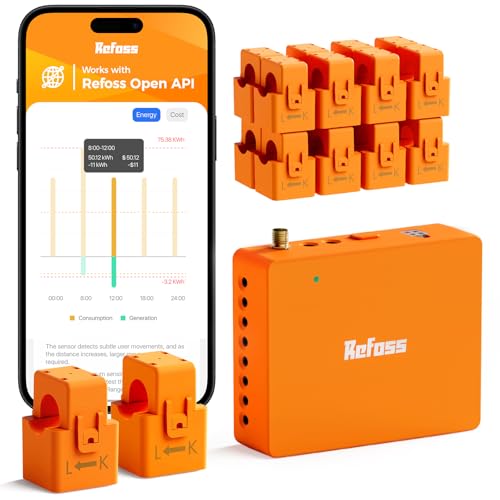
Best for Flexible Local Access – Refoss 18-Circuit Monitor
If you want smart energy meters that expose readings to multiple local tools, this Refoss monitor offers a web interface, open API, MQTT, and WebSocket. The supplied two main sensors and 16 branch sensors let you examine usage across a busy panel.
Best For: DIY energy dashboards and circuit-level audits that avoid cloud dependence.
Pros:
- Provides local access options and Home Assistant integration via Refoss_RPC.
- Offers usage history, CSV export, and alerts for unusual appliance consumption.
- Includes an external Wi-Fi antenna and lets you reverse backward CT readings in the app.
Cons:
- Home Assistant integration is specified through Refoss_RPC rather than described as native.
- Each branch sensor is rated up to 60A, so check the circuits you need to monitor.
This is a good fit for hands-on buyers who will use its data access and exports. Confirm your electrical system is among its supported single-phase, split-phase, or four-wire Wye configurations.
Best for App-Based Energy Management – Emporia Vue 3
The Emporia Vue 3 suits shoppers comparing smart energy meters who prefer app-guided monitoring and energy-management settings. Its 16 included branch sensors can track major household loads, while the app supports time-of-use, peak-demand, and excess-solar strategies.
Best For: Households comfortable with cloud-connected monitoring and app-based automations.
Pros:
- UL and CE listed, with 16 included 50A branch sensors.
- Supports solar and net-metering monitoring plus actionable app notifications.
- Offers cloud data export and indefinitely retained hourly data.
Cons:
- Requires 2.4 GHz Wi-Fi and an internet connection for app monitoring.
- One-second readings are available only while the app is open and are retained for three hours; minute data is kept for seven days.
- Three-phase, four-wire Wye installations need an additional 200A sensor sold separately.
Vue 3 is compelling if its automation features match how you manage electricity costs. If local-only access or extended high-resolution history is essential, its connectivity and retention limits deserve close attention.
Compact Pick – Shelly EM Gen3
Among smart energy meters, the Shelly EM Gen3 is a compact choice for monitoring a single-phase setup. Its included 50A clamp, two-channel design, and Wi-Fi connection suit buyers who want energy readings plus smart-home automation.
Best For: Single-phase homes seeking compact monitoring and contactor-based control.
Pros:
- Includes a 50A clamp and logs one-minute readings locally for up to 10 days.
- Works with Alexa, Google Home, Home Assistant, and SmartThings.
- Can control a connected contactor to cut power to non-essential loads.
Cons:
- Designed for single-phase monitoring rather than broad circuit-by-circuit coverage.
- Local one-minute data logging is limited to 10 days.
Choose it when space and automation flexibility matter more than extensive historical data or whole-panel circuit detail.
Panel Monitoring Pick – Emporia Vue 3 with 8 Circuit Sensors
The Emporia Vue 3 is one of the smart energy meters to consider if you want whole-home readings alongside eight circuit sensors. It installs in a compatible electrical panel and provides app-based usage, spending, and solar or net-metering insights.
Best For: Households that want panel-level monitoring, eight circuit sensors, and app-based energy management.
Pros:
- UL and CE Listed, with clamp-on sensors and a stated ±2% sensor accuracy.
- Supports solar and net metering, alerts, and time-of-use energy-management settings.
- Offers iPhone, Android, and web access with exportable cloud data.
Cons:
- Monitoring requires 2.4 GHz Wi-Fi and an internet connection.
- One-second data is available only while the app is open and is retained for three hours.
Its eight included circuit sensors make it a practical middle ground for understanding household loads, provided cloud-connected monitoring suits your setup.
High-Circuit-Count Pick – Meross EM16 Energy Monitor
For buyers comparing smart energy meters by circuit coverage, the Meross EM16 monitors two 200A main circuits and 16 60A branch circuits. It combines real-time readings and alerts with local-data features and Home Assistant integration.
Best For: Homes needing extensive circuit monitoring and local Home Assistant-based solar automation.
Pros:
- Covers 18 circuits total, with stated ±2% accuracy for measured electrical data.
- Offers custom usage alerts, up to five years of data storage, and hourly report exports.
- Supports local data, an open API, and Home Assistant solar-surplus automations without subscriptions.
Cons:
- The described solar-surplus automation relies on Home Assistant integration.
- Three-phase compatibility excludes Delta systems.
This is the strongest fit here for detailed branch-circuit visibility if you also want local control; confirm your panel configuration matches its supported wiring systems.
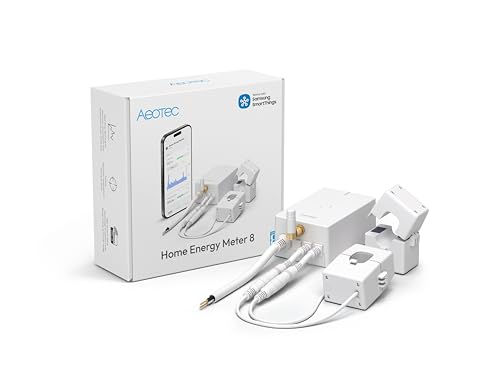
Best for Z-Wave Homes – Aeotec Home Energy Meter 8
Among smart energy meters, the Aeotec Home Energy Meter 8 is a fit for households that already use a Z-Wave hub. Its two included 200A clamp sensors track electricity use and production across up to two phases or split phases, including solar surplus.
Best For: SmartThings or Home Assistant users who want whole-home monitoring through Z-Wave rather than a Wi-Fi energy monitor.
Pros:
- Includes two 200A clamps for monitoring up to two phases or split phases.
- Tracks both consumption and production in real time.
- Supports Z-Wave Long Range and S2 security with AES-128 encryption.
Cons:
- Requires a compatible Z-Wave hub to share monitoring data.
- No branch-circuit sensors are listed in the included components.
This is the more natural choice if Z-Wave is already part of your setup. Check your panel configuration and hub compatibility before buying.
Best for Expandable Monitoring – Emporia Vue 3
The Emporia Vue 3 is a practical pick among smart energy meters if you want whole-home electricity and solar or net-metering data now, with the option to add circuit-level detail later. It installs in the circuit panel and reports through the Emporia app.
Best For: Homeowners who want a UL-listed monitor with app-based cost insights and optional circuit monitoring.
Pros:
- UL-listed, with clamp-on installation for supported electrical systems.
- App supports live reporting, notifications, and time-of-use energy settings.
- Can add up to sixteen 50A branch sensors for appliance or circuit monitoring.
Cons:
- Branch sensors are sold separately.
- Monitoring requires 2.4 GHz Wi-Fi and an internet connection.
- One-second readings are available only while the app is actively open and are retained for three hours.
Vue 3 offers a useful upgrade path from whole-home readings to individual circuits. Factor in the cost of extra sensors if appliance-level tracking is your priority.
Best for Multi-Circuit Tracking – SEM-Meter 16-Sensor Monitor
If you need readings from several rooms or appliances, this SEM-Meter stands out among smart energy meters by including sixteen 50A circuit sensors. Its app shows real-time use and costs, with pricing templates for allocating electricity charges across circuits.
Best For: Rental homes or shared properties that need circuit-by-circuit usage and cost estimates.
Pros:
- Includes sixteen 50A sensors for circuit-level monitoring.
- Supports solar and net metering plus customizable time-of-use pricing templates.
- Offers a local MQTT privacy mode without the vendor cloud or app when used with Home Assistant.
Cons:
- Local-only operation requires Home Assistant with MQTT.
- Panels with access only to busbars need separate flexible sensors.
The included sensors make this a strong option when per-circuit data matters from day one. Confirm that your panel is compatible and decide whether you prefer the app or the MQTT-based local setup.
How We Picked These Smart Energy Meters
We focused on the practical differences buyers can identify from the listed products: whole-home versus circuit-level monitoring, support for solar or production tracking, local integrations, and sensor capacity. Several entries are variants or repeat listings of the Emporia Vue 3, so the ten selections should not be read as ten distinct platforms. Compare each listing’s included clamps, circuit sensors, and stated features before ordering.
Quick Comparison
For detailed panel data, look first at the Meross 18-circuit model, the Refoss 16-sensor model, and the 16-sensor monitor listed for rental homes. Emporia Vue 3 is another option to examine for power-usage and solar monitoring; confirm the accessories in the particular package you choose. For fewer measurement points, Shelly EM Gen3 includes a 50A clamp, while Aeotec Home Energy Meter 8 lists two 200A clamps and Z-Wave Long Range. If local smart-home control matters, compare the Refoss Open API/no-cloud model with the Home Assistant support specified on certain Meross and Refoss listings.
Key Buying Factors for Smart Energy Meters
What Do You Need to Measure?
A whole-home monitor can reveal daily patterns and peak demand, but it may not identify a specific appliance. Circuit-level sensors provide more useful detail for loads such as heating, cooling, or EV charging. Count the circuits you actually want to track rather than buying the largest sensor bundle by default.
Panel Fit and Installation
Check your electrical service, panel layout, available breaker space, clamp sizes, and the number of current-transformer inputs. Not every sensor fits every conductor or installation. Panel work involves hazardous voltage; follow the manufacturer’s instructions and use a qualified electrician when required.
Integrations, Data, and Costs
Decide whether you need an app, Home Assistant, an open API, Z-Wave, or local operation without cloud access. Verify which functions work offline rather than assuming that local integration covers every feature. For cost estimates, check whether you can enter your tariff: a simple rate may not reflect time-of-use pricing, fixed fees, or taxes. Solar owners should also verify that the chosen configuration distinguishes consumption from production.
Who Should Buy Which Smart Energy Meters?
Choose a multi-circuit kit if your main goal is finding which circuits contribute most to your bill. Choose a smaller clamp-based meter when you only need to watch a limited number of loads and have confirmed its electrical fit. Prioritize Refoss’s stated local and Open API features, or a compatible Home Assistant listing, if you want data in your own automations. Consider Aeotec if Z-Wave is central to your setup. For solar, shortlist models that explicitly support production tracking, then verify sensor placement and package contents before buying.